
Route Planning
Plan the whole network, not one route at a time.
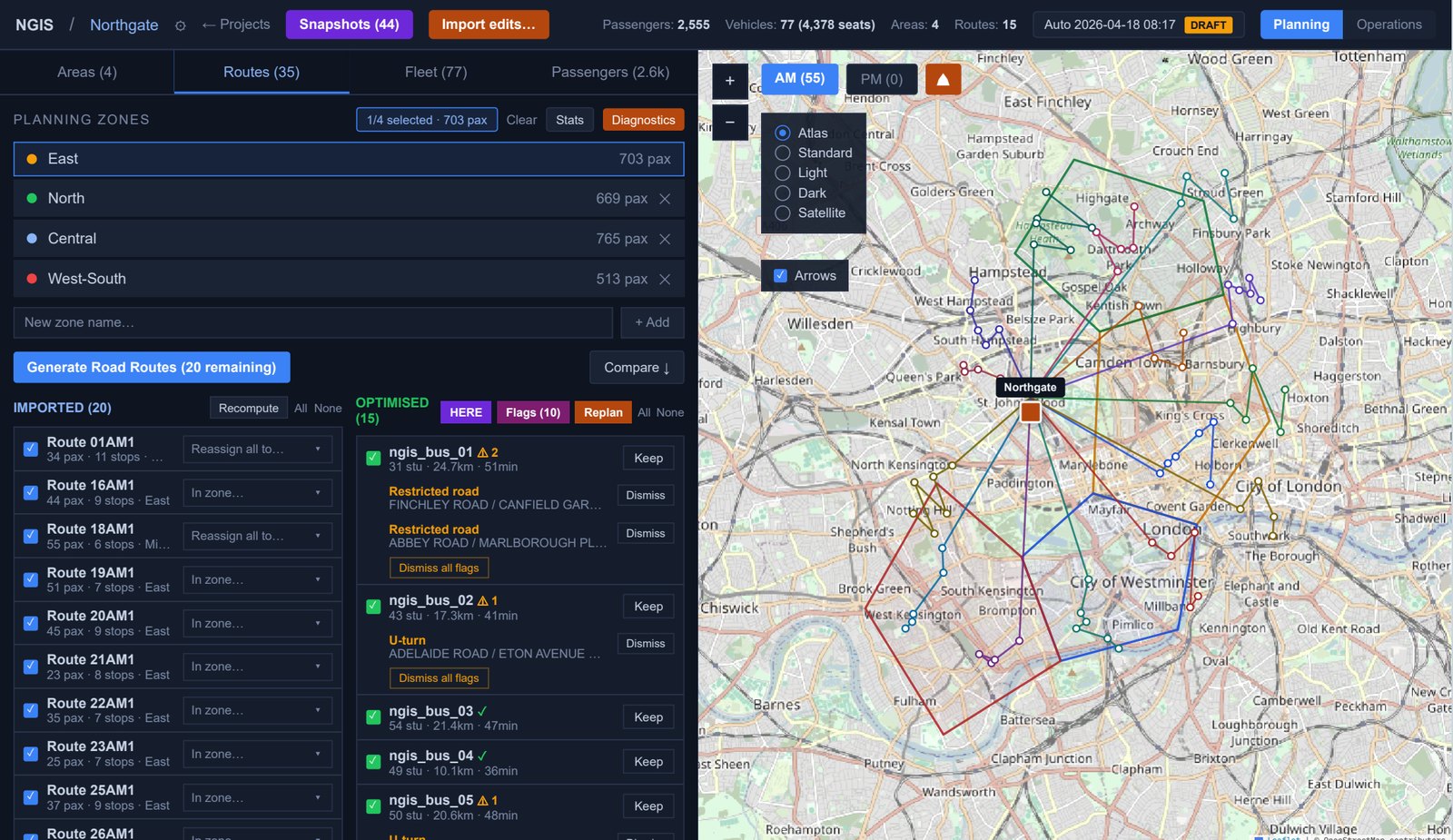
Divide the catchment into planning zones, import what you run today, and let the optimiser propose an alternative. Then compare the two side by side before anything is committed.
Every proposal stays a draft until your school accepts it
Summer
Next year's routes, plotted by hand.
Every summer, transport teams plot routes on Google Maps, trying to balance thousands of addresses, buses and school times by hand.
With Together School the whole network is planned at once: planning zones, your current routes imported, an optimised proposal and a side-by-side comparison, all kept as a draft until you accept it.
The network planner
Every route, planned together.
Plan the whole network at once, with the constraints your school actually works with.
01
Planning zones
Draw zones that match how your school actually splits its catchment, and plan them one at a time or together.
02
Your routes, imported
Bring in the routes you run today. They are recomputed against real road geometry, so the comparison starts from the roads the buses really use.
03
An optimised proposal
The optimiser proposes an alternative network for the zones you choose, ready to review route by route.
04
Real constraints
Bus size, ride time, speed limits and operating cost are all constrained, so a proposal is one your buses can run.
05
Flagged, not hidden
Restricted roads and U-turns are flagged for review, not built in silently. Keep a route, dismiss a flag or replan it.
06
Side by side
The comparison panel puts imported and optimised routes next to each other: buses, students, stops, trip times and the pickup window.
07
Morning and afternoon
AM and PM are planned separately, and each version is snapshotted as a draft you can come back to.
08
A draft until you accept
Every proposal is a draft until your school accepts it, so you can try ideas without touching the routes running today.
Then stop by stop
Once the network is agreed, keep it right every day.
Manage Routes handles the day to day: the stops, the pupils on each stop, and the buses and drivers that run them. A change to the live routes reaches the server in about a second, and two officers editing at once see each other's changes within a second or two.
01
Health check
Scans the whole school for the usual mistakes: a pupil on several stops, near-identical stop names, stops with no passengers, a bus too small for its pupils, and routes drivers will not see.
02
Plan next term safely
A data-set is a named draft of the whole school's routes and fleet. Nothing in it reaches drivers or parents until it is activated, and the live data can be snapshotted first.
03
Find, undo, import
Find any route, stop or pupil by name or School ID, undo and redo every change, and import Excel into a draft that never touches the live routes.
04
Drivers see their routes
Bus companies, buses, drivers and supervisors are linked to routes from either side, and each driver sees only the routes linked to them that run today.
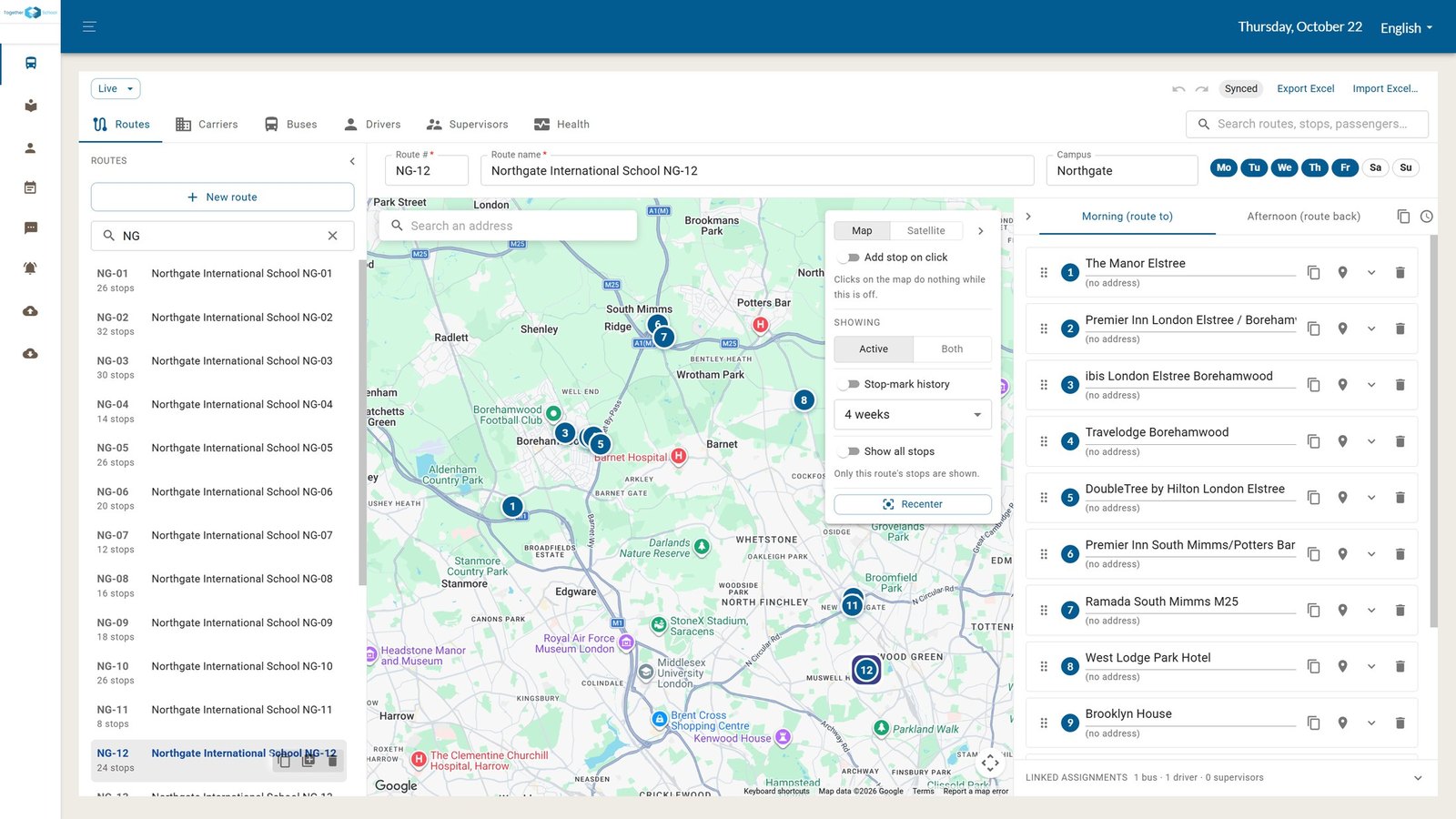
Manage Routes: route list, map and stops, with the fleet tabs and Health across the top. Sample data.
Optimise, then compare
See the new timetable before anything changes.
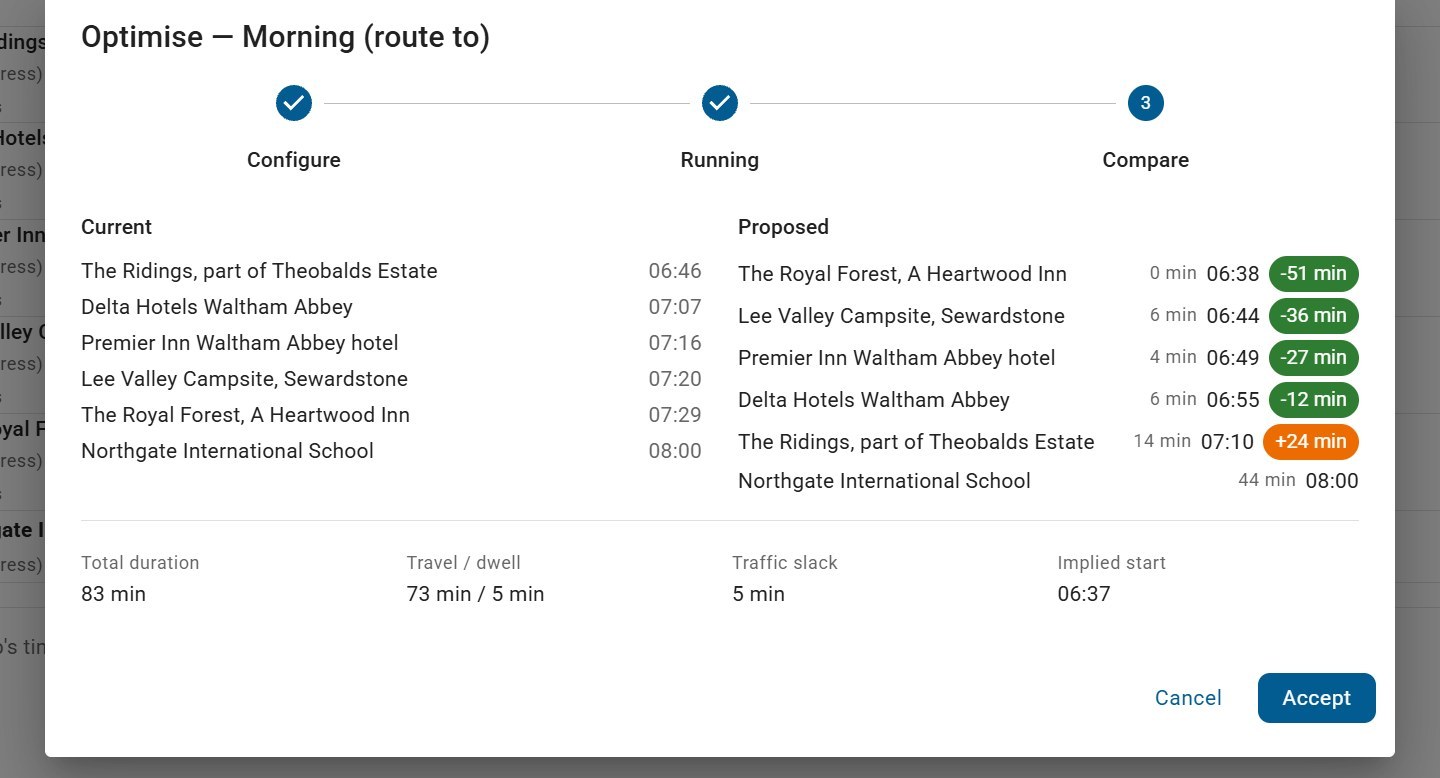
Before changing times, stop-mark history shows each stop's average and worst lateness on recent runs. Optimise then re-orders a direction's stops and re-times them around the school's time, with the time per stop and per pupil you set and live traffic if you want it. Compare shows the current timetable beside the proposed one with the total duration, and nothing is saved until you accept and apply it.
Stop-mark history
Time per stop and per pupil
Live traffic
Side-by-side timetable
One platform
Planning that carries through to the school day.
The routes you plan are the routes drivers run, parents follow and the transport office monitors, all in one platform.
Transport
Transportation Management
Every route running today on one screen: live map, stops and children, history and alarms.
Explore Transportation ManagementService
Managed Transport Services
Prefer us to plan it? Full network plans each year, ongoing route optimisation and a verified, geocoded address for every bus user.
Explore Managed Transport ServicesSafety
Diversions & Safe Zones
Redirect buses in transit to Safe Zones within minutes when the school can't be reached.
Explore Diversions & Safe ZonesActivities
After School Activities
Club bookings reach the buses, so each bus knows who is staying late.
Explore After School ActivitiesDrivers
Bus Staff App
Each driver sees today's routes linked to them, with turn-by-turn navigation to the next stop.
Explore the Bus Staff AppParents
Parent App
The daily bus schedule with real boarding and arrival times, and the live bus position on the map.
Explore the Parent AppOnline roundtable · Tuesday 1 December 2026
Managed Transport Services: what can your school hand over?
10:00 to 11:00 CET (09:00 GMT, 13:00 Dubai). A small working group for school leaders on what to hand over, from registration and route planning to monitoring and compliance, and what to keep.
Plan next year's network with the whole picture.
Tell us how your routes run today and we will show your team the network planner and Manage Routes.
Book a demo